WPF에서는 데이터, 브러시, 문자열, 템플릿, 스타일 등 다양한 요소를 리소스(Resource)로 저장하고 재사용할 수 있다. 컨트롤·윈도우·애플리케이션 단위로 리소스를 선언할 수 있으며, 스타일, 템플릿, UI 재사용에서 핵심적인 역할을 한다. 이번 글에서는 WPF 리소스 개념과 함께 StaticResource / DynamicResource 차이, 로컬·전역 리소스, CodeBehind에서의 리소스 조회까지 정리한다.
📌 StaticResource와 DynamicResource
WPF에서 리소스를 참조하는 방법은 크게 두 가지이다: 정적 리소스 StaticResource와 동적 리소스 DynamicResource.
StaticResource (정적 리소스)
리소스를 처음 로드하는 시점에 한 번만 가져오며 이후 변경되지 않는다. 성능이 좋고 대부분의 경우 StaticResource를 사용하는 것이 일반적이다.
예제
<Window x:Class="WPF_Resource.MainWindow"
        xmlns="http://schemas.microsoft.com/winfx/2006/xaml/presentation"
        xmlns:x="http://schemas.microsoft.com/winfx/2006/xaml"
        xmlns:d="http://schemas.microsoft.com/expression/blend/2008"
        xmlns:mc="http://schemas.openxmlformats.org/markup-compatibility/2006"
        xmlns:local="clr-namespace:WPF_Resource"
		xmlns:sys="clr-namespace:System;assembly=mscorlib"
		mc:Ignorable="d"
        Title="MainWindow" Height="450" Width="800">

	<Window.Resources>
		<SolidColorBrush x:Key="MyBrush" Color="Red"/>
	</Window.Resources>

	<Grid>
		<Grid>
			<Button Content="Button 1" Background="{StaticResource MyBrush}" Width="100" Height="100"
					HorizontalAlignment="Left" VerticalAlignment="Top"/>
			<Button Content="Button 2" Background="{StaticResource MyBrush}" Width="100" Height="100"
					HorizontalAlignment="Right" VerticalAlignment="Top"/>
		</Grid>
	</Grid>
</Window>
두 버튼은 모두 처음 로드된 Red 브러시를 그대로 사용한다.

DynamicResource (동적 리소스)
DynamicResource는 런타임에 리소스를 변경할 가능성이 있을 때 사용한다. 리소스가 바뀌면 UI도 자동으로 갱신된다.
예제
<Window x:Class="WPF_Resource.MainWindow"
        xmlns="http://schemas.microsoft.com/winfx/2006/xaml/presentation"
        xmlns:x="http://schemas.microsoft.com/winfx/2006/xaml"
        xmlns:d="http://schemas.microsoft.com/expression/blend/2008"
        xmlns:mc="http://schemas.openxmlformats.org/markup-compatibility/2006"
        xmlns:local="clr-namespace:WPF_Resource"
		xmlns:sys="clr-namespace:System;assembly=mscorlib"
		mc:Ignorable="d"
        Title="MainWindow" Height="450" Width="800">

	<Window.Resources>
		<SolidColorBrush x:Key="MyBrush" Color="Red"/>
	</Window.Resources>

	<Grid>

		<Grid>
			<Button Content="Button 1" Background="{DynamicResource MyBrush}" Width="100" Height="100"
					HorizontalAlignment="Left" VerticalAlignment="Top"/>
			<Button Content="Button 2" Background="{DynamicResource MyBrush}" Width="100" Height="100"
					HorizontalAlignment="Right" VerticalAlignment="Top"/>

		</Grid>

		<Grid>
			<Grid.Resources>
				<SolidColorBrush x:Key="MyBrush" Color="Blue"/>
			</Grid.Resources>
			<Grid>
				<Button Content="Button 1" Background="{DynamicResource MyBrush}" Width="100" Height="100"
						HorizontalAlignment="Left" VerticalAlignment="Bottom"/>
				<Button Content="Button 2" Background="{DynamicResource MyBrush}" Width="100" Height="100"
						HorizontalAlignment="Right" VerticalAlignment="Bottom"/>
			</Grid>
		</Grid>
	</Grid>
</Window>
Grid 내부에서 MyBrush를 다시 정의하면, 그 범위에 있는 컨트롤들은 자동으로 Blue로 변경된다.

📊 Static vs Dynamic 비교
| 구분 | StaticResource | DynamicResource |
|---|---|---|
| 로딩 시점 | 초기 로딩 시 한 번 | 런타임에 계속 참조 |
| 리소스 변경 반영 | X | O (UI 자동 갱신) |
| 성능 | 빠름 | 느림(런타임 바인딩) |
| 적합한 경우 | 변경되지 않는 값 | 테마 변경 등 동적 UI |
📦 다양한 리소스 타입
리소스에는 브러시뿐 아니라 문자열, 배열, 템플릿 등 다양한 타입이 올 수 있다.
<Window x:Class="WPF_Resource.MainWindow"
        xmlns="http://schemas.microsoft.com/winfx/2006/xaml/presentation"
        xmlns:x="http://schemas.microsoft.com/winfx/2006/xaml"
        xmlns:d="http://schemas.microsoft.com/expression/blend/2008"
        xmlns:mc="http://schemas.openxmlformats.org/markup-compatibility/2006"
        xmlns:local="clr-namespace:WPF_Resource"
		xmlns:sys="clr-namespace:System;assembly=mscorlib"
		mc:Ignorable="d"
        Title="MainWindow" Height="450" Width="800">
	<Window.Resources>
		<SolidColorBrush x:Key="MyBrush" Color="Red"/>
		<sys:String x:Key="ComboBoxTitle">Fruits:</sys:String>

		<x:Array x:Key="ComboBoxItems" Type="sys:String">
			<sys:String>Apple</sys:String>
			<sys:String>Banana</sys:String>
			<sys:String>Mango</sys:String>
		</x:Array>

		<LinearGradientBrush x:Key="WindowBackgroundBrush">
			<GradientStop Offset="0" Color="Silver"/>
			<GradientStop Offset="1" Color="Gray"/>
		</LinearGradientBrush>
	</Window.Resources>

	<Grid>
		<StackPanel Margin="10">
			<Label Content="{StaticResource ComboBoxTitle}" />
			<ComboBox ItemsSource="{StaticResource ComboBoxItems}" />
		</StackPanel>
	</Grid>
</Window>
sys:String 사용 시 주의
System.String을 사용하려면 XAML 상단에 다음 네임스페이스를 추가해야 한다.
xmlns:sys="clr-namespace:System;assembly=mscorlib"
📍 리소스 범위: 로컬 vs 전역
로컬 리소스
리소스가 선언된 컨트롤 내부에서만 사용 가능하다.
<Window x:Class="WPF_Resource.MainWindow"
        xmlns="http://schemas.microsoft.com/winfx/2006/xaml/presentation"
        xmlns:x="http://schemas.microsoft.com/winfx/2006/xaml"
        xmlns:d="http://schemas.microsoft.com/expression/blend/2008"
        xmlns:mc="http://schemas.openxmlformats.org/markup-compatibility/2006"
        xmlns:local="clr-namespace:WPF_Resource"
		xmlns:sys="clr-namespace:System;assembly=mscorlib"
		mc:Ignorable="d"
        Title="MainWindow" Height="450" Width="800">
	<Window.Resources>

	</Window.Resources>

	<StackPanel Margin="10">
		<StackPanel.Resources>
			<sys:String x:Key="ComboBoxTitle">StackPanel's Resource</sys:String>
		</StackPanel.Resources>
		<Label Content="{StaticResource ComboBoxTitle}"
			   FontSize="50"
			   FontWeight="Bold"
			   HorizontalAlignment="Center"/>
	</StackPanel>

</Window>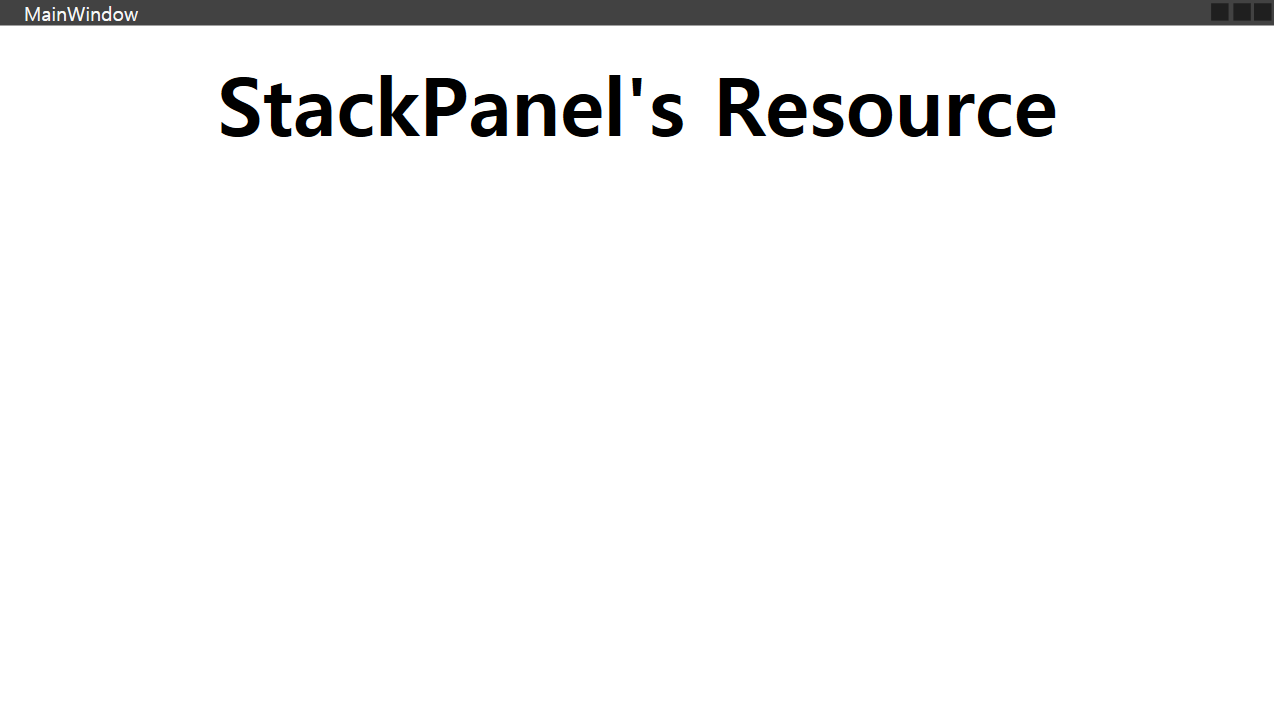
전역(App) 리소스
App.xaml에서 선언되면 프로그램 전체에서 사용 가능하다.
<Application x:Class="WPF_Resource.App"
             xmlns="http://schemas.microsoft.com/winfx/2006/xaml/presentation"
             xmlns:x="http://schemas.microsoft.com/winfx/2006/xaml"
             xmlns:local="clr-namespace:WPF_Resource"
			 xmlns:sys="clr-namespace:System;assembly=mscorlib"
			 StartupUri="MainWindow.xaml">
	<Application.Resources>
		<sys:String x:Key="strApp">Hello, Application world!</sys:String>
	</Application.Resources>
</Application>
🧩 CodeBehind에서 리소스 읽기
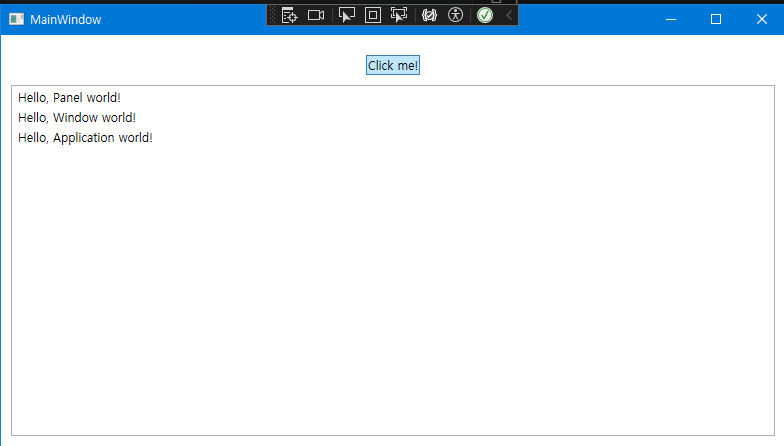
리소스는 FindResource()로 조회할 수 있으며, 반환 타입은 object이다.
Xaml
<Window x:Class="WPF_Resource.MainWindow"
        xmlns="http://schemas.microsoft.com/winfx/2006/xaml/presentation"
        xmlns:x="http://schemas.microsoft.com/winfx/2006/xaml"
        xmlns:d="http://schemas.microsoft.com/expression/blend/2008"
        xmlns:mc="http://schemas.openxmlformats.org/markup-compatibility/2006"
        xmlns:local="clr-namespace:WPF_Resource"
		xmlns:sys="clr-namespace:System;assembly=mscorlib"
		mc:Ignorable="d"
        Title="MainWindow" Height="450" Width="800">
	<Window.Resources>
		<sys:String x:Key="strWindow">Hello, Window world!</sys:String>
	</Window.Resources>
	<DockPanel Margin="10" Name="pnlMain">
		<DockPanel.Resources>
			<sys:String x:Key="strPanel">Hello, Panel world!</sys:String>
		</DockPanel.Resources>

		<WrapPanel DockPanel.Dock="Top" HorizontalAlignment="Center" Margin="10">
			<Button Name="btnClickMe" Click="btnClickMe_Click">Click me!</Button>
		</WrapPanel>

		<ListBox Name="lbResult" />
	</DockPanel>
</Window>
CodeBehind
using System;
using System.Collections.Generic;
using System.Linq;
using System.Text;
using System.Threading.Tasks;
using System.Windows;
using System.Windows.Controls;
using System.Windows.Data;
using System.Windows.Documents;
using System.Windows.Input;
using System.Windows.Media;
using System.Windows.Media.Imaging;
using System.Windows.Navigation;
using System.Windows.Shapes;

namespace WPF_Resource
{
    /// <summary>
    /// MainWindow.xaml에 대한 상호 작용 논리
    /// </summary>
    public partial class MainWindow : Window
    {
        public MainWindow()
        {
            InitializeComponent();
        }

        private void btnClickMe_Click(object sender, RoutedEventArgs e)
        {
            lbResult.Items.Add(pnlMain.FindResource("strPanel").ToString());
            lbResult.Items.Add(this.FindResource("strWindow").ToString());
            lbResult.Items.Add(Application.Current.FindResource("strApp").ToString());
        }
    }
}
리소스 탐색 우선순위
WPF는 아래 순서로 리소스를 탐색한다.
- 컨트롤(ResourceDictionary)
- 부모 요소
- Window.Resources
- Application.Resources
- 테마 리소스
📋 정리
- StaticResource는 빠르고 정적이며, 대부분의 상황에서 사용된다.
- DynamicResource는 런타임 변경이 필요할 때만 사용한다.
- 리소스는 브러시, 문자열, 템플릿 등 다양한 타입으로 선언할 수 있다.
- 리소스는 범위(Local → Parent → Window → Application 순)로 탐색된다.
- CodeBehind에서는
FindResource로 동적으로 조회할 수 있다.
'C# > 데스크톱 앱' 카테고리의 다른 글
| [WPF] WPF의 마크업 언어, XAML (0) | 2025.11.25 |
|---|---|
| [WPF] App.xaml, Application의 시작점 (0) | 2025.11.23 |
| [WPF] 기본 개념, 핵심 속성, VS 편집 팁 정리 (1) | 2025.11.17 |
| WPF vs WinForms — C# 데스크톱 UI 프레임워크 비교 (0) | 2025.11.08 |